How I Set Up a TURN Server for Reliable WebRTC
When direct peer-to-peer connections break, a reliable TURN server is the fallback that makes calls work in real-world networks.
The problem, straight
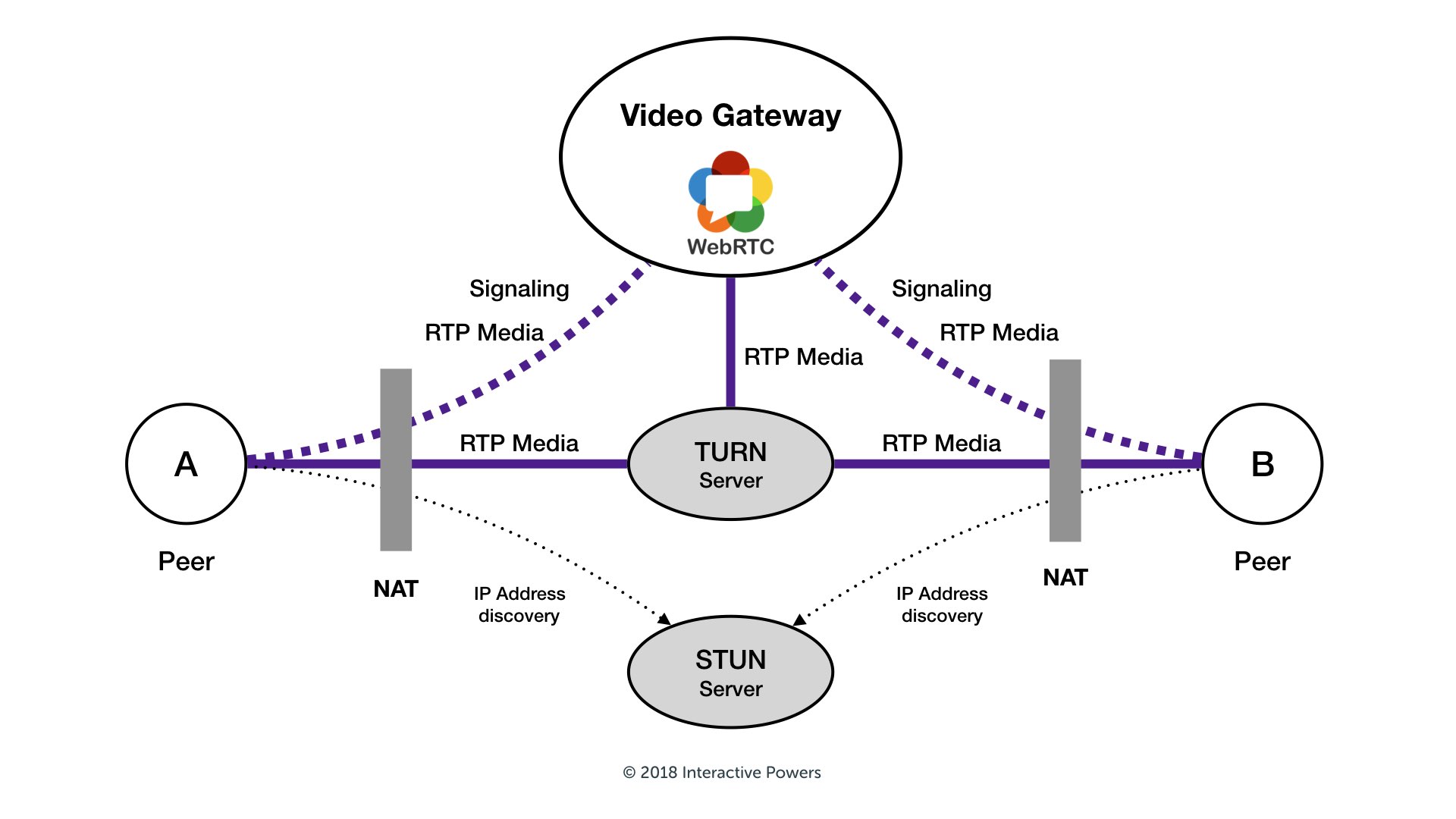
WebRTC is designed to connect peers directly. In many cases, this works well. But when users are behind restrictive NATs or corporate firewalls, direct media exchange often fails. STUN can help discover public IP addresses, but it cannot relay media traffic.
TURN solves this by acting as a relay. Both peers connect to the TURN server, and media flows through it. In my case, calls were connecting inconsistently and sometimes had one-way audio. Adding TURN fixed those issues immediately.
Why this matters
- Users on strict or corporate networks can still join calls.
- Media routing becomes predictable instead of fragile.
- The application feels reliable across different ISPs and network setups.
What this article covers
- Why I chose coturn
- Installation basics
- A minimal production-ready configuration
- Firewall and networking notes
- Client-side WebRTC setup
- Credential handling
- Testing and common mistakes
Why coturn
Coturn is a widely used open-source TURN/STUN server. It is actively maintained, supports long-term credentials, TLS, and detailed logging, and works well for both small and medium-scale deployments.
Installation
sudo apt update
sudo apt install coturn -y
turnserver -vsudo systemctl enable coturn
sudo systemctl start coturn
sudo journalctl -u coturn -fMinimal production configuration
listening-port=3478
tls-listening-port=5349
listening-ip=0.0.0.0

realm=example.com
lt-cred-mech
static-auth-secret=YOUR_STRONG_SECRET

cert=/path/to/fullchain.pem
pkey=/path/to/privkey.pem

external-ip=YOUR_PUBLIC_IP

min-port=49152
max-port=65535

log-file=/var/log/turnserver/turn.log
verbose
no-stdout-log

fingerprint
Firewall and networking
- UDP/TCP 3478
- TCP 5349
- UDP 49152–65535
Client-side WebRTC configuration
const pc = new RTCPeerConnection({
  iceServers: [
    { urls: 'stun:stun.l.google.com:19302' },
    {
      urls: 'turn:turn.example.com:3478?transport=udp',
      username: 'user',
      credential: 'pass'
    },
    {
      urls: 'turns:turn.example.com:5349?transport=tcp',
      username: 'user',
      credential: 'pass'
    }
  ]
});
Credential strategy
Use short-lived TURN credentials generated on your backend. This reduces abuse and avoids leaking long-term secrets.
Testing and debugging
- chrome://webrtc-internals
- /var/log/turnserver/turn.log
- Trickle ICE testing tools
Common pitfalls
- Missing UDP relay ports
- No external-ip behind NAT
- Invalid TLS certificates
Cost and scaling notes
TURN relays all media traffic, so bandwidth is the primary cost. For small deployments, one VM is usually enough.
Final thoughts
TURN is not glamorous, but it is essential for reliable WebRTC in production. A clean coturn setup with TLS and short-lived credentials solves most real-world connectivity issues.
This is an excerpt from Abdulvahab Shaikh's How I Set Up a TURN Server for Reliable WebRTC article. I highly recommend you give it a read!